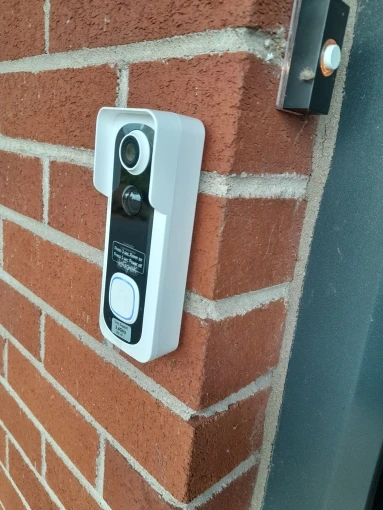
Wireless Video Doorbell Camera with Chime and Two-Way Audio (HD)
Wireless Video Doorbell Camera with Chime and Two-Way Audio (HD)
Regular price
$98.50
Regular price
$169.99
Sale price
$98.50
Shipping calculated at checkout.
Free Shipping
Free Returns & 60-Day Warranty
Secure Checkout – SSL Encrypted
Quantity
Couldn't load pickup availability
Estimated Delivery:
Oct 01
–
Oct 05
(3–8 Business Days)
Handling Time: 1–3 Business Days
This wireless video doorbell camera provides clear HD video, motion alerts, and two-way audio for everyday home entry monitoring. Battery-powered operation and WiFi connectivity allow flexible installation without wired setup.
Key Features
- Wireless video doorbell with indoor chime
- HD video recording with wide viewing angle
- Two-way audio communication
- Motion-activated alerts and recording
- Infrared night vision for low-light conditions
- Battery-powered design for easy installation
- Weather-resistant housing for outdoor use
Technical Specifications
- Video Resolution: HD (manufacturer-stated)
- Viewing Angle: 130°
- Audio: Two-way audio with built-in microphone and speaker
- Motion Detection: PIR motion detection
- Alert Function: Yes
- Connectivity: 2.4GHz WiFi (not compatible with 5GHz)
- Storage: Local storage via microSD card (up to 128GB) and cloud storage option
- Power Source: Battery powered
- Battery Capacity: 5600mAh
- Protection Rating: IP65
- Installation Type: Wireless, non-wired
- Color Display: Yes
Product Description
- Support both CloudEdge APP or ieGeek Cam APP
- Not support RTSP / ONVIF / NVR / FTP
- Only Support 2.4Ghz Wifi( Not support 5Ghz Wifi)
- Compact Size: 5.79 * 2.20 * 1.50 inch / 14.7 * 5.6 * 3.8 cm
Suitable For
- Home front doors and entryways
- Apartments and residential properties
- Users who want wireless installation without wiring
- Visitor awareness and basic entry monitoring
Why Choose This Product
Offers practical home entry monitoring with wireless setup, clear video, and motion alerts. Battery power and included chime make it suitable for everyday residential use.
3 Minutes to Complete Installation & Setup
Install the microSD Memory Card
- Insert the provided pin into the small hole at the bottom of the doorbell.
- Gently remove the doorbell from the mounting bracket.
- Locate the memory card slot on the left side of the doorbell.
- Insert the microSD card and reattach the doorbell to the bracket.
Install the Doorbell to Door or Wall
- Mount the doorbell at a recommended height of approximately 4 feet (120 cm) from the ground.
- Avoid placing the doorbell behind obstructions or facing reflective surfaces to ensure proper motion detection and video clarity.
Pairing the Chime with the Doorbell
- The doorbell and chime are paired by default before use.
- If the connection is lost, follow the pairing steps shown in the setup video to reconnect them manually.
- One doorbell can be paired with multiple chimes.




 If you want to adjust the angle of the doorbell monitor, you can go after sale service to get free angle adjustment bracket.




Wireless Video Doorbell Camera with Chime and Two-Way Audio (HD)
$169.99
$98.50